Simon Currin - 01 Feb 2021
Click image above to view video.
Privacy and API issues have delayed the OCC App but it is finally just over the horizon and will be a powerful tool for every OCC Member to have in their pocket whether online or off line. The OCC App harvests data from our Members Database, from our website, from our Cruising Information Database, from our OCC Fleetmap and puts it on a smartphone or iPAD. iOS and Android are both supported, Below is a brief introductory video demonstrating the power and the simplicity of the OCC App. Once the beta version is accepted by the App Store it will be available for all Members to download free of charge. You will only need to logon when you start using it and those logo on credentials are the same ones that you use to access both the OCC Forum and the Members area of our website.
Thanks are due to Joe Jollands for persevering with this project and to those on the GC who laboured hard over the privacy issues which, and many points, seemed unsurmountable.
Here is a brief written summary of what the OCC App can do:
Here is a summary of what the OCC App can do:
- Periodically synchronises with the Club’s database and with MarineTraffic boat position database and it can do this using both wifi and mobile data. Most of that synchronised data is then available on the smartphone when the internet is not available.
- Plots the positions of all OCC boats registered on the OCC Fleet Map and these update twice a day.
- Displays all recent OCC News articles as published on the Website
- Displays and searches Flying Fish Articles
- Displays and searches all OCC Port Officers and Port Officer Representatives as well as the additional pilotage PDF data file by each PO - PLEASE CAN TED, FI AND EOIN TAKE THIS ON BOARD.
- Displays and searches the entire Membership Database
- Displays all of the Club’s Cruising and pilotage information on a map with clickable drawing pins. Data is also displayed from the Royal Cruising Club Pilotage Foundation
- Enables the Member to file a boat position report direct to the MarineTraffic Database provided that the member has a free MarineTraffic account and narrowband email connections. The position data is derived from the smartphone's inbuilt GPS.
- Enables the Member to file a Cruising Notice with position data derived from the smartphone’s GPS.
Bill Balme - 04 Feb 2021
Congratulations Simon and all concerned - looks like a very nice and powerful cruising tool! Great demonstration.
It was originally planned that much of the App data would be available when off-line - is that still the case or does one have to be linked to the internet? Of particular interest (for me) is when arriving in a port, prior to arranging internet, I'd like to know what members are around me - so access to vessel and member details would be key...
Well done!
It was originally planned that much of the App data would be available when off-line - is that still the case or does one have to be linked to the internet? Of particular interest (for me) is when arriving in a port, prior to arranging internet, I'd like to know what members are around me - so access to vessel and member details would be key...
Well done!
Simon Currin - 04 Feb 2021
Bill
Most of the data is held offline and refreshes when the app is restarted when a Wi-fi or 4g connection is available. That includes boat position data and members details. The data accessed via links obviously requires a data connection. So yes it does everything that we specified but has the MarineTraffic API too.
Simon
Most of the data is held offline and refreshes when the app is restarted when a Wi-fi or 4g connection is available. That includes boat position data and members details. The data accessed via links obviously requires a data connection. So yes it does everything that we specified but has the MarineTraffic API too.
Simon
Bill Balme - 4 Feb 2021
Congratulations Simon and all concerned - looks like a very nice and powerful cruising tool! Great demonstration.
It was originally planned that much of the App data would be available when off-line - is that still the case or does one have to be linked to the internet? Of particular interest (for me) is when arriving in a port, prior to arranging internet, I'd like to know what members are around me - so access to vessel and member details would be key...
Well done!
George.Curtis - 06 Feb 2021
Simon Currin - 1 Feb 2021
Click image above to view video.
Privacy and API issues have delayed the OCC App but it is finally just over the horizon and will be a powerful tool for every OCC Member to have in their pocket whether online or off line. The OCC App harvests data from our Members Database, from our website, from our Cruising Information Database, from our OCC Fleetmap and puts it on a smartphone or iPAD. iOS and Android are both supported, Below is a brief introductory video demonstrating the power and the simplicity of the OCC App. Once the beta version is accepted by the App Store it will be available for all Members to download free of charge. You will only need to logon when you start using it and those logo on credentials are the same ones that you use to access both the OCC Forum and the Members area of our website.
Thanks are due to Joe Jollands for persevering with this project and to those on the GC who laboured hard over the privacy issues which, and many points, seemed unsurmountable.
Here is a brief written summary of what the OCC App can do:
Here is a summary of what the OCC App can do:
- Periodically synchronises with the Club’s database and with MarineTraffic boat position database and it can do this using both wifi and mobile data. Most of that synchronised data is then available on the smartphone when the internet is not available.
- Plots the positions of all OCC boats registered on the OCC Fleet Map and these update twice a day.
- Displays all recent OCC News articles as published on the Website
- Displays and searches Flying Fish Articles
- Displays and searches all OCC Port Officers and Port Officer Representatives as well as the additional pilotage PDF data file by each PO - PLEASE CAN TED, FI AND EOIN TAKE THIS ON BOARD.
- Displays and searches the entire Membership Database
- Displays all of the Club’s Cruising and pilotage information on a map with clickable drawing pins. Data is also displayed from the Royal Cruising Club Pilotage Foundation
- Enables the Member to file a boat position report direct to the MarineTraffic Database provided that the member has a free MarineTraffic account and narrowband email connections. The position data is derived from the smartphone's inbuilt GPS.
- Enables the Member to file a Cruising Notice with position data derived from the smartphone’s GPS.
Simon, this is brillant.
Well done all who have been involved in this venture. I greatly look forward to getting the App.
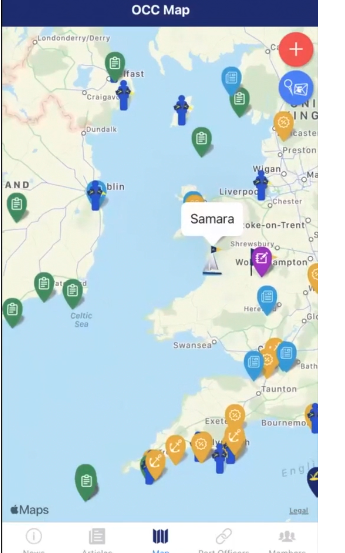
Roger Harris has been in touch re Cruising Information and we have talked about trying to write user instructions to get the most out of the App and Web site. Your video is a great start to this but those like me who may be a bit slow to grasp it all on the first view might welcome a wtitten 'how to' guide. For instance a decode list of the icons: Blue - events, Green - crusing notices, Blue burgee - Flying Fish, Red burgee - Blogs (brilliant!) . Are the Yellow/Gold ones with anchors and crosses for specific places? I saw a Purple one not far from where you live - is that a Flag Officer? If you submit an inforamtion position report, does it show up as a green icon or as a yellow icon? And I presume that these reports are checked by a modertor before publication. Any chance of getting hold of the Beta App? I turned doen Jo's original invitatoin cos I only had an iPhone 5 - now upgraed to a 12. And thanks for the recognition in your spiel. Glad the summary data is useful.
George
Simon Currin - 06 Feb 2021
George,
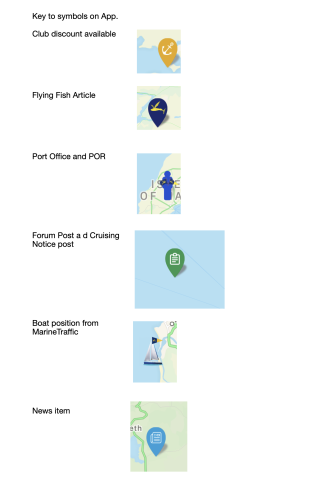
Here is a rough and ready key.
The purple is a draft Cruising Notice generated in the App. At present these are not uploaded to the database but, when they are, the will go via a moderation queue.
Simon
Here is a rough and ready key.
The purple is a draft Cruising Notice generated in the App. At present these are not uploaded to the database but, when they are, the will go via a moderation queue.
Simon
Simon Currin - 11 Feb 2021
OCC App Live
At last the OCC App is live on App store and Google Play - just search on OCC App or use the following links:
https://apps.apple.com/gb/app/occ-app/id1457092792https://apps.apple.com/gb/app/occ-app/id1457092792
https://play.google.com/store/apps/details?id=com.igcenterprises.apps.occv1
There are still a few glitches with links to cruising notices and the MarineTraffic Feed isn't yet live but otherwise it's working pretty well. At present the cruising information generated on the app isn't linked back to the club's database so reports generated will not be uploaded.
Hopefully we will be ready to make a club-wide announcement soon.
Simon
At last the OCC App is live on App store and Google Play - just search on OCC App or use the following links:
https://apps.apple.com/gb/app/occ-app/id1457092792https://apps.apple.com/gb/app/occ-app/id1457092792
https://play.google.com/store/apps/details?id=com.igcenterprises.apps.occv1
There are still a few glitches with links to cruising notices and the MarineTraffic Feed isn't yet live but otherwise it's working pretty well. At present the cruising information generated on the app isn't linked back to the club's database so reports generated will not be uploaded.
Hopefully we will be ready to make a club-wide announcement soon.
Simon
Bill Balme - 11 Feb 2021
With just a few minutes playing it looks excellent - and fast.
Already see a few possible things - do you want to set up a location for feedback or is this thread the spot?
Simon Currin - 11 Feb 2021
This thread is fine.
Simon
Simon
Bill Balme - 11 Feb 2021
With just a few minutes playing it looks excellent - and fast.
Already see a few possible things - do you want to set up a location for feedback or is this thread the spot?
Bill Balme - 15 Feb 2021
Initial observations:
1. My initial location when using the map appears to be represented by an OCC flag - there's no notation on it, but it's in close proximity with my GP location. Other boats around me have drop-down info - and while granted I know who and what boat I am, it would be comforting to see 'Toodle-oo!' displayed like the other boats. Alternatively, perhaps use of a blue dot - as then using Google Maps??
2. Searching a vessel name works well - fast - but does not allow me to go to the map location for that vessel - I therefore can't find a vessel's location with this feature.
3. If I want to see where my friends are across the Atlantic, I can't see how to accomplish that - pinching the screen out doesn't allow a big enough picture to allow me to cross the Atlantic except by taking numerous short screen hops.
4. I generally write an anchorage report after the fact - not when I'm right there. So to put a position report up I have to first look up and input the Lat Lon of the anchorage, and then compose the report. (Whereas on the CA's Captain's Mate, I can scroll to a location and input information at the location of my cursor.)
5. Many of the reports appear to be off location - some rather considerably - is this related to 4?
1. My initial location when using the map appears to be represented by an OCC flag - there's no notation on it, but it's in close proximity with my GP location. Other boats around me have drop-down info - and while granted I know who and what boat I am, it would be comforting to see 'Toodle-oo!' displayed like the other boats. Alternatively, perhaps use of a blue dot - as then using Google Maps??
2. Searching a vessel name works well - fast - but does not allow me to go to the map location for that vessel - I therefore can't find a vessel's location with this feature.
3. If I want to see where my friends are across the Atlantic, I can't see how to accomplish that - pinching the screen out doesn't allow a big enough picture to allow me to cross the Atlantic except by taking numerous short screen hops.
4. I generally write an anchorage report after the fact - not when I'm right there. So to put a position report up I have to first look up and input the Lat Lon of the anchorage, and then compose the report. (Whereas on the CA's Captain's Mate, I can scroll to a location and input information at the location of my cursor.)
5. Many of the reports appear to be off location - some rather considerably - is this related to 4?
bwallace - 01 Mar 2021
Hi Simon,
I have now got around to looking at the new app.
The demo was very comprehensive.
Question: can this app be used on an iPhone 5 Or will I need to upgrade my phone?
Secondly, is it compatible with using on a iPad and is there any advantage or disadvantage with that?
Well done to all involved in the development.
Brian Wallace
S/V Darramy
I have now got around to looking at the new app.
The demo was very comprehensive.
Question: can this app be used on an iPhone 5 Or will I need to upgrade my phone?
Secondly, is it compatible with using on a iPad and is there any advantage or disadvantage with that?
Well done to all involved in the development.
Brian Wallace
S/V Darramy
Simon Currin - 01 Mar 2021
Brian,
Good question and the answer is I don’t know. The App definitely runs well on iPhone 7 and IPad. It has meagre data requirements (53MB). Best to try an see if it works.
Many of the glitches identified in the beta version are now sorted and we are exploring implementing some of Bill Balme’s tweaks. The app is already downloadable from the App Store but we are holding back on the announcement until the MarineTraffic feed is switched on and more of the content is made viewable offline (cruising notices).
Simon
Good question and the answer is I don’t know. The App definitely runs well on iPhone 7 and IPad. It has meagre data requirements (53MB). Best to try an see if it works.
Many of the glitches identified in the beta version are now sorted and we are exploring implementing some of Bill Balme’s tweaks. The app is already downloadable from the App Store but we are holding back on the announcement until the MarineTraffic feed is switched on and more of the content is made viewable offline (cruising notices).
Simon
bwallace - 1 Mar 2021
Hi Simon,
I have now got around to looking at the new app.
The demo was very comprehensive.
Question: can this app be used on an iPhone 5 Or will I need to upgrade my phone?
Secondly, is it compatible with using on a iPad and is there any advantage or disadvantage with that?
Well done to all involved in the development.
Brian Wallace
S/V Darramy
Sandy.Garrity - 02 Mar 2021
Hello Simon
I've just downloaded the app and looking at my own boat, Aphrodite (MMSI 235036786) I can see on the app sat quietly at her berth at King Point, Plymouth but the owner is shown as Thomas Deasy. Aphrodite as changed from a Gib'Sea 96 to a lovely Amel Maramu 46, MMSI 367406540 also called Aphrodite. I suspect there is a problem with the API in matching MMSI numbers to duplicate boat names.
Slainte
Sandy
I've just downloaded the app and looking at my own boat, Aphrodite (MMSI 235036786) I can see on the app sat quietly at her berth at King Point, Plymouth but the owner is shown as Thomas Deasy. Aphrodite as changed from a Gib'Sea 96 to a lovely Amel Maramu 46, MMSI 367406540 also called Aphrodite. I suspect there is a problem with the API in matching MMSI numbers to duplicate boat names.
Slainte
Sandy
Steve.Neal - 10 Mar 2021
Any idea why I keep seeing this screen?
Our network is OK here today so it looks like your server is offline.
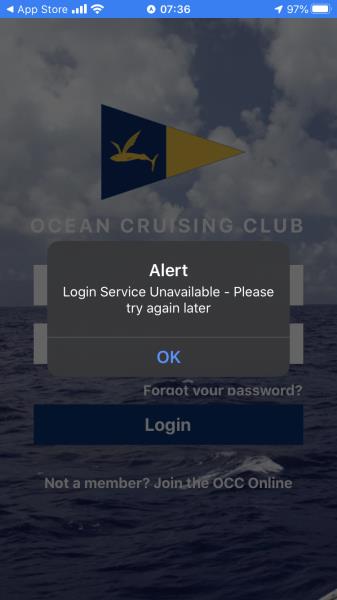
Our network is OK here today so it looks like your server is offline.
Simon Currin - 10 Mar 2021
Steve
It may be a server bandwidth issue if a large number of members are trying out fir the first time following my email. We will flag it with the developer.
Simon
It may be a server bandwidth issue if a large number of members are trying out fir the first time following my email. We will flag it with the developer.
Simon
Steve.Neal - 10 Mar 2021
Any idea why I keep seeing this screen?
Our network is OK here today so it looks like your server is offline.
Simon Currin - 10 Mar 2021
Steve
I’m told it is now working
Simon
I’m told it is now working
Simon
Steve.Neal - 10 Mar 2021
Any idea why I keep seeing this screen?
Our network is OK here today so it looks like your server is offline.
Steve.Neal - 10 Mar 2021
Simon Currin - 10 Mar 2021
Steve
I’m told it is now working
SimonSteve.Neal - 10 Mar 2021Any idea why I keep seeing this screen?
Our network is OK here today so it looks like your server is offline.
I can sign in now thanks.
There may be issues with your content though. The News area seems OK, but there's nothing under Articles, Port Officers, or Members. The Map has no icons on it either and is blank apart from the OCC flag at our current location.
Simon Currin - 10 Mar 2021
Steve
It sounds an incomplete download for whatever reason. Please delete and try again when the rush has gone through! Once properly downloaded the data sits on your device and will be much more stable with much smaller data exchanges with each refresh.
Simon
It sounds an incomplete download for whatever reason. Please delete and try again when the rush has gone through! Once properly downloaded the data sits on your device and will be much more stable with much smaller data exchanges with each refresh.
Simon
Steve.Neal - 10 Mar 2021
Simon Currin - 10 Mar 2021Steve
I’m told it is now working
SimonSteve.Neal - 10 Mar 2021Any idea why I keep seeing this screen?
Our network is OK here today so it looks like your server is offline.
I can sign in now thanks.
There may be issues with your content though. The News area seems OK, but there's nothing under Articles, Port Officers, or Members. The Map has no icons on it either and is blank apart from the OCC flag at our current location.
Steve.Neal - 10 Mar 2021
Simon Currin - 10 Mar 2021
Steve
It sounds an incomplete download for whatever reason. Please delete and try again when the rush has gone through! Once properly downloaded the data sits on your device and will be much more stable with much smaller data exchanges with each refresh.
SimonSteve.Neal - 10 Mar 2021Simon Currin - 10 Mar 2021Steve
I’m told it is now working
SimonSteve.Neal - 10 Mar 2021Any idea why I keep seeing this screen?
Our network is OK here today so it looks like your server is offline.
I can sign in now thanks.
There may be issues with your content though. The News area seems OK, but there's nothing under Articles, Port Officers, or Members. The Map has no icons on it either and is blank apart from the OCC flag at our current location.
That makes sense - how large is the download? We're on our boat in the Bahamas at the moment so our network is a bit slow.
I'll try again in a day or two.
Simon Currin - 10 Mar 2021
55MB.
Simon
Simon
Steve.Neal - 10 Mar 2021
Simon Currin - 10 Mar 2021Steve
It sounds an incomplete download for whatever reason. Please delete and try again when the rush has gone through! Once properly downloaded the data sits on your device and will be much more stable with much smaller data exchanges with each refresh.
SimonSteve.Neal - 10 Mar 2021Simon Currin - 10 Mar 2021Steve
I’m told it is now working
SimonSteve.Neal - 10 Mar 2021Any idea why I keep seeing this screen?
Our network is OK here today so it looks like your server is offline.
I can sign in now thanks.
There may be issues with your content though. The News area seems OK, but there's nothing under Articles, Port Officers, or Members. The Map has no icons on it either and is blank apart from the OCC flag at our current location.
That makes sense - how large is the download? We're on our boat in the Bahamas at the moment so our network is a bit slow.
I'll try again in a day or two.
Sandy.Garrity - 15 Jun 2021
Update on my comments above.
I checked my position on the app now I am moving the boat and glad to report the following.
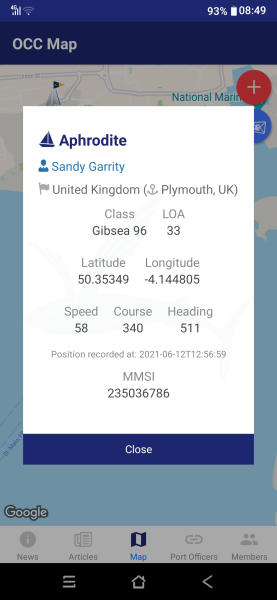
Aphrodite (MMSI 235036786) has been seen to move but the other Aphrodite (MMSI 367406540) is still sat on my berth!
There are some very odd figures, speeds of 50 knots and totally random heading and course figures some over 360°.
I checked my position on the app now I am moving the boat and glad to report the following.
Aphrodite (MMSI 235036786) has been seen to move but the other Aphrodite (MMSI 367406540) is still sat on my berth!
There are some very odd figures, speeds of 50 knots and totally random heading and course figures some over 360°.
bweigel2@gmail.com - 15 Jun 2021
Sandy.Garrity - 15 Jun 2021
Update on my comments above.
I checked my position on the app now I am moving the boat and glad to report the following.
Aphrodite (MMSI 235036786) has been seen to move but the other Aphrodite (MMSI 367406540) is still sat on my berth!
There are some very odd figures, speeds of 50 knots and totally random heading and course figures some over 360°.
Hello Sandy - I imaging that there is not room in your berth for both Aphrodites. We will have the American one repositioned. The confusion stems from the original position setup. In order to have a more complete fleet, we supplied historic positions for vessels. The position for MMSI 367... was mistakenly entered in your berth rather than the actual location of Monterey, CA. I have asked our APP developer to make this adjustment. As for the odd figures, for speed course and heading, this will require a bit more research.
Thank you for your feedback. Bill Weigel
Sandy.Garrity - 15 Jun 2021
bweigel2@gmail.com - 15 Jun 2021
Sandy.Garrity - 15 Jun 2021Update on my comments above.
I checked my position on the app now I am moving the boat and glad to report the following.
Aphrodite (MMSI 235036786) has been seen to move but the other Aphrodite (MMSI 367406540) is still sat on my berth!
There are some very odd figures, speeds of 50 knots and totally random heading and course figures some over 360°.
Hello Sandy - I imaging that there is not room in your berth for both Aphrodites. We will have the American one repositioned. The confusion stems from the original position setup. In order to have a more complete fleet, we supplied historic positions for vessels. The position for MMSI 367... was mistakenly entered in your berth rather than the actual location of Monterey, CA. I have asked our APP developer to make this adjustment. As for the odd figures, for speed course and heading, this will require a bit more research.
Thank you for your feedback. Bill Weigel
Thanks Bill, here is a screenshot that what is currently on the app. The speed looks like it might need a decimal point, the course is about right, but the heading is very odd.